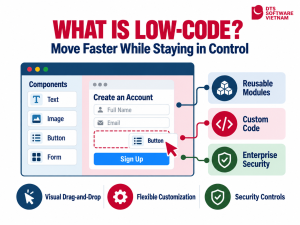
Low-code is an approach to application development that uses visual interfaces and prebuilt components to reduce manual coding and shorten delivery times. However, businesses still need to manage requirements, architecture, integration, security, and operations. Compared with no-code, low-code allows developers to add custom logic; compared with traditional development, it prioritizes configuration and reuse. To achieve meaningful results, businesses should start with a clearly defined use case and measurable outcomes.
What Is Low-Code, and What Is It Changing?
Low-code is a software development approach that reduces manual coding through visual interfaces, data models, and prebuilt components. Instead of developing every feature from scratch, users can build interfaces using drag-and-drop tools, configure business rules, and connect data or services through APIs. Developers can still add custom code to address specialized requirements.
The change goes beyond building interfaces faster. This approach shifts some work from writing individual lines of code to modeling processes, configuring components, standardizing integrations, and validating outputs. Developers can therefore focus more on architecture, specialized logic, integration, security, and issues the platform cannot handle on its own.
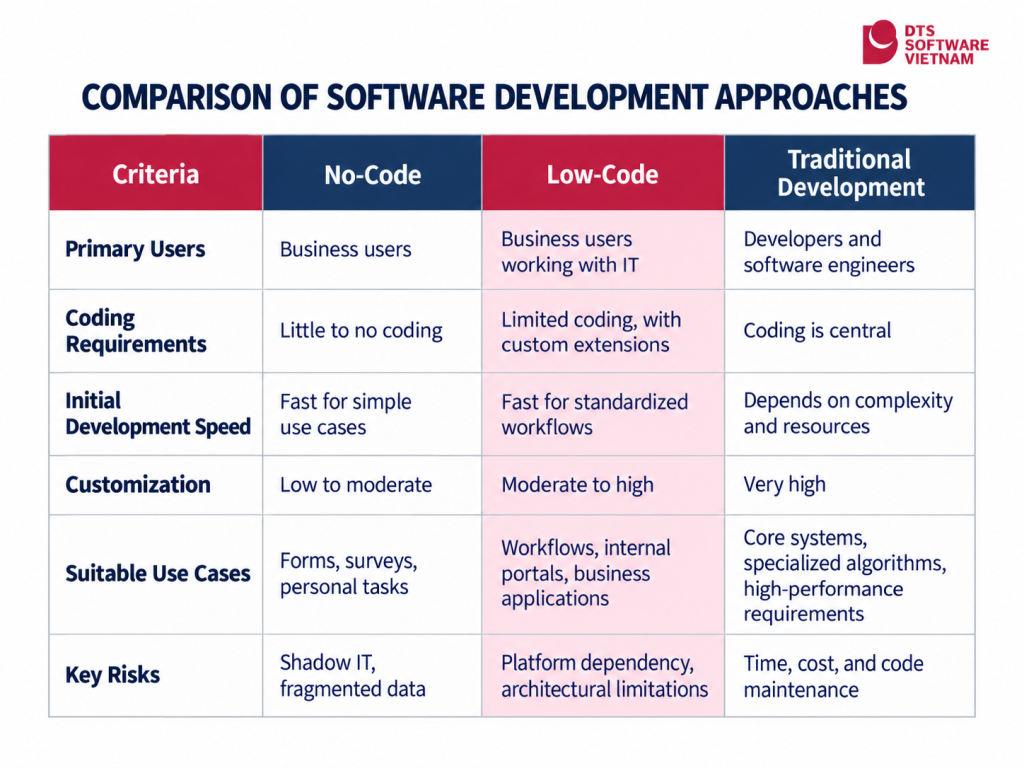
How Does Low-Code Differ from No-Code and Traditional Development?
To understand low-code, it helps to distinguish it from no-code and traditional development. These three approaches are not mutually exclusive. A business might use no-code for simple forms, a low-code platform for business applications, and traditional development for core systems that require high performance or extensive customization.
How Can Low-Code Help Businesses Move Faster?
Building an initial application quickly does not necessarily mean the entire project will be delivered sooner. If requirements are unclear, data is difficult to integrate, or the platform cannot handle exceptions in business processes, time saved during interface development may turn into additional rework during testing and operations.
Shortening the Cycle from Requirements to Testing
Prebuilt components help project teams create prototypes, let users test them, and identify incorrect requirements before investing too heavily in the product. The greatest benefit often lies in faster learning: business teams see the proposed solution earlier, while technical teams receive feedback before the architecture becomes difficult to change.
Connecting Business and Technical Teams
Visual models help business users describe workflows and evaluate prototypes. However, IT must remain responsible for architecture, data, security, quality, and maintainability. This collaboration matters more than the drag-and-drop functionality itself.
Reusing Components Without Overlooking Governance
Forms, authentication, roles, notifications, and data connections can be standardized and reused across multiple applications. Shadow IT refers to applications or tools used outside the IT department’s governance framework. If a business allows users to create applications without rules for data, permissions, testing, and releases, the initial speed advantage can lead to duplicate applications, maintenance difficulties, or shadow IT.
What Are the Limitations of Low-Code?
Not every application should be built through visual configuration. Businesses should exercise caution when a system has one or more of the following characteristics:
- Specialized algorithms, real-time processing, or performance requirements that prebuilt components struggle to support.
- User interfaces and experiences that require extensive, fine-grained customization.
- A long-lived core system built on a platform that lacks clear export formats, source-code access, or a migration path.
- Sensitive data subject to storage, segregation, or audit requirements that the vendor cannot yet meet.
- Licensing costs that increase with users, applications, or executions, pushing the total cost of ownership beyond budget as the system scales.
Vendor lock-in should be considered from the outset. Research on interoperability between platforms indicates that businesses may need to rebuild data models, interfaces, and workflows when switching tools if platform formats are incompatible.
Which Business Needs Can Low-Code Support?
Suitable use cases typically have well-defined processes and verifiable outputs, such as internal portals, request management, approvals, case tracking, and operational dashboards. Core systems and real-time tasks require separate assessment.
An Illustrative Purchase Requisition Workflow
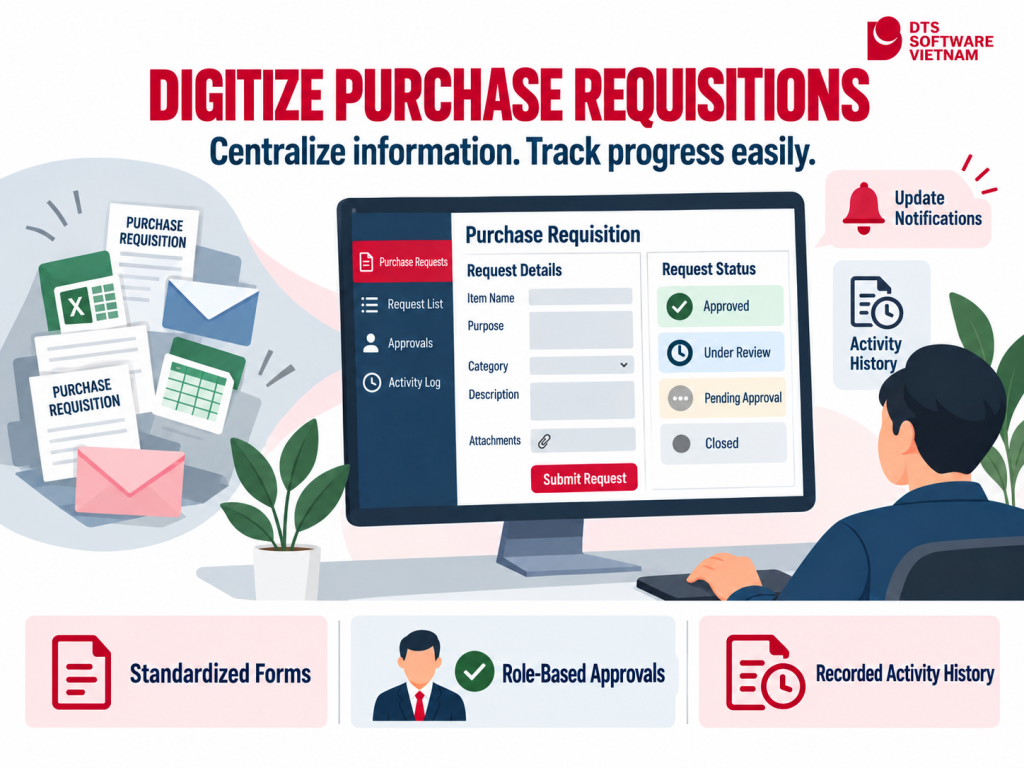
A purchase requisition workflow helps explain what low-code looks like in practice. Suppose a business manages purchase requests through email and spreadsheets, making statuses difficult to track, leaving gaps in submitted information, and requiring manual report compilation.
A low-code pilot application could include forms, approval rules, notifications, logs, and a dashboard to centralize information and track processing.
Businesses should pilot the application in one department, collect baseline data before implementation, and track the following metrics:
- Median time from request submission to a decision.
- Percentage of requests requiring additional information because of missing data fields.
- Number of manual email or message exchanges per request.
- Percentage of requests with traceable approvers and change histories.
- Licensing, implementation, and operating costs per request.
This is an illustrative scenario, not an actual implementation result or a performance guarantee. Value can only be established by comparing data before and after implementation within the same scope.
What Criteria Should Businesses Use to Select a Platform?
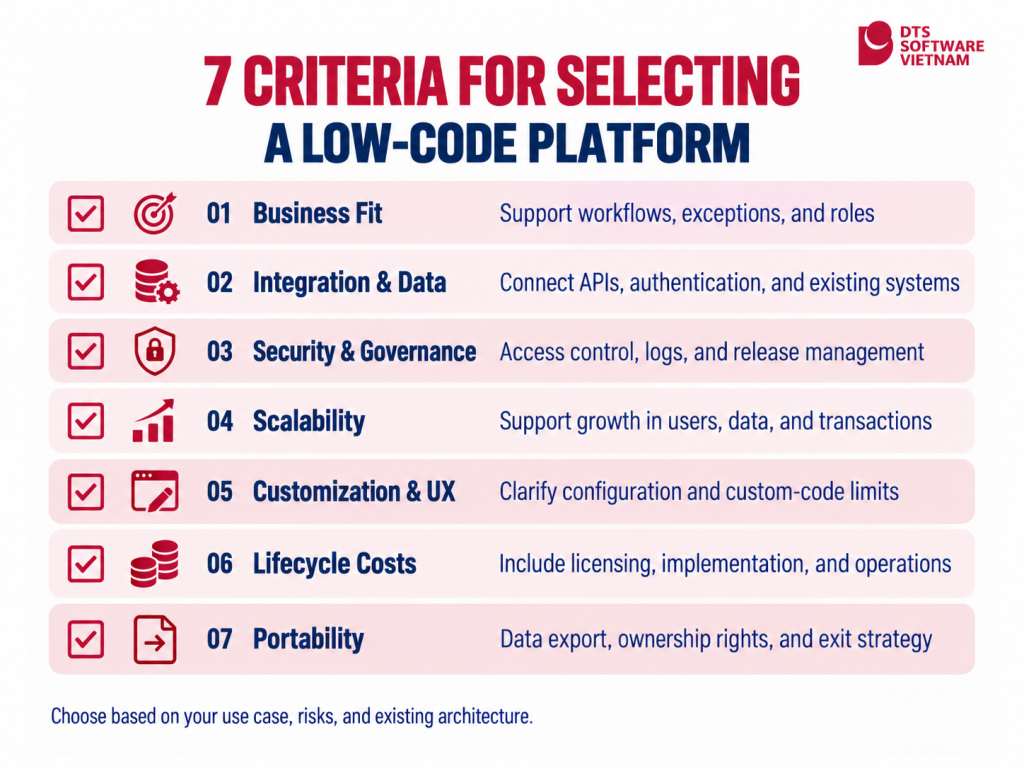
Once businesses understand low-code, they need to select a platform based on their actual requirements. Antonio Lamanna (2025) proposes a weighted scoring model covering five groups of criteria: workflows, user interfaces, integration, governance and security, and AI-enabled automation. This is a research preprint on arXiv, not a mandatory standard.
The checklist below is an editorial framework comprising seven categories for reference. It adds considerations around cost and portability and does not reproduce the research model.
Prioritizing Criteria According to the Use Case
The same weighting should not be applied to every project. For an internal approval application, workflow modeling and access control may take priority. For an application connecting multiple systems, data synchronization and error-handling mechanisms require careful assessment.
Validating Capabilities Through a Test Scenario
Ask the vendor to demonstrate a specific process, including its exceptions. How will the system handle and record an absent approver, incorrect input, or an interrupted connection? Which elements can be configured, and which require code?
The evaluation should be supported by a working prototype, technical documentation, and cost projections for scaling. Businesses should also clarify ownership of custom code, data export formats, and support responsibilities when the contract ends.
Implementation Practices: From Pilot to Scale
Step 1: Choose a Small but Valuable Use Case
Prioritize a repeatable process with a designated owner, a clear scope, and sufficient data for measurement. Avoid choosing a core system or sensitive data for the first project.
Step 2: Establish a Baseline
Record processing times, error rates, manual steps, costs, and satisfaction levels before implementation. Without a baseline, the project team will struggle to demonstrate results.
Step 3: Define Governance Before Granting Access
Determine who can create applications, who approves data connections, and which naming standards, testing procedures, backup policies, and logging requirements apply. Assign responsibility for incident handling.
Step 4: Build an MVP and Test It with Users
The initial version should cover only the main workflow and a few important exceptions. Test access permissions, invalid data, concurrent actions, connection failures, and recovery capabilities.
Step 5: Evaluate Before Scaling
Compare results against the baseline, consolidate feedback, and calculate lifecycle costs. Expand only when the solution meets the required thresholds for effectiveness, security, maintainability, and user acceptance.
DTSVN’s Perspective: Faster Delivery Requires a Strong Technical Foundation
DTS Software Vietnam provides ITO and BPO services and is a subsidiary of Japan’s DTS Corporation. On its official website, DTSVN identifies visual development solutions as one of its capability areas, alongside software development, testing, data services, cloud, system modernization, security, and operations.
In a low-code project, a technology partner’s value extends beyond building the application. Work should begin with process assessment, requirements clarification, and a clear definition of technical boundaries: which elements can be configured using existing components, which require custom development, which data must be integrated, and which controls must remain in place.
DTSVN can support businesses from use-case assessment, architecture design, and prototyping through to integration, testing, and operations. A combined approach helps businesses benefit from faster delivery while maintaining scalability, security, and quality control. Architecture and data should also be prepared to reduce future migration costs if the platform no longer meets the business’s needs.
Businesses can explore DTS Software Vietnam’s business capabilities, its approach to cloud and system modernization, and its perspective on citizen development with no-code and low-code, or contact DTSVN to discuss their requirements before selecting a platform and defining the pilot scope.
Conclusion: Low-Code Helps Businesses Move Faster, but Getting It Right Still Matters
What is low-code? It is an approach to software development that uses models, configuration, and reusable components to reduce manual coding while still allowing custom development when needed. It delivers the clearest value in business applications with a defined scope, frequently changing requirements, and a need for rapid experimentation.
- Do not assess a platform solely by how quickly it creates interfaces; examine integration, data, security, and operations.
- Start with a process that has a baseline and specific success metrics.
- Calculate the total cost of ownership and define an exit strategy before signing a contract.
- Maintain IT’s role in architecture, testing, access control, and lifecycle governance.
Treat low-code as part of the technology portfolio, rather than a replacement for every software development approach.